
- Published on
Practical AWS governance for fast-moving engineering teams
- Authors

- Name
- Younes ZADI
Giving engineers access to AWS is always a balancing act.
On one side, if you lock everything down, you get the “ticket-driven cloud”: every new S3 bucket, IAM tweak, or Lambda permission becomes a request to the SRE / platform team. The result is predictable: slow delivery, frustrated engineers, and an infrastructure team that turns into a permanent bottleneck.
On the other side, if you give broad admin permissions “so people can move fast”, you may move fast… right into problems: surprise cloud bills, accidental public exposure, production drift, broken compliance, and permission sprawl that becomes impossible to audit or reason about.
This article is about a third path: a governance framework that enables engineers with real autonomy, while still enforcing strong, explicit boundaries.
The goal isn’t to remove the SRE team from the loop. It’s to reserve SRE time for the right work:
- building shared platforms,
- owning foundational infrastructure (networking, observability, security baselines),
- handling exceptions and high-risk changes,
- instead of approving day-to-day “please create X” requests.
We’ll build a model that provides:
- flexibility where it’s safe (especially in staging),
- tight control where it’s critical (production),
- clear ownership and auditability everywhere,
- using AWS’ native services:
Organizations,Identity Center,SCPs,Control Tower,Permission Boundaries,IAMpolicies, andResource-basedpolicies.
By the end, you should have a concrete blueprint you can adapt to your company.
1. What Software Engineers Are Actually Allowed to Do
To design meaningful guardrails, we first need to be explicit about what engineers are expected to do in each environment — and just as importantly, what they are not.
1.1. Staging Accounts (team-x-staging)
Staging is where engineers should be able to move fast, experiment, and iterate — but still within clear cost and security boundaries.
Engineers CAN:
- Deploy and update
Lambdafunctions - Create and update
S3buckets (non-public only) - Create and manage
DynamoDBtables - Create and manage
SQSandSNS - Create and manage
API Gatewayresources - Read and write
CloudWatchlogs and metrics - Trigger
Step Functions - Use pre-defined
IAMroles provided by the platform (for example, execution roles forLambda) - Deploy infrastructure using
Serverless,CDK, orTerraform
Engineers CANNOT:
- Create
EC2instances - Create
RDS/Aurora/Redshift - Modify
VPCs, subnets, route tables, or internet gateways - Create
NATgateways or other high-cost networking components - Disable logging, monitoring, or security services
- Escalate permissions beyond defined boundaries
- Create
IAMusers,IAMroles, or long-lived access keys - Modify
SCPs, permission boundaries, or organization-level settings
The intent is to allow full ownership of application-level infrastructure while preventing accidental creation of high-cost or high-blast-radius resources.
1.2. Production Accounts (team-x-production)
Production prioritizes stability, auditability, and safety over speed. Engineers CAN:
- Read application logs
- Read metrics and dashboards
- Read runtime configuration
- Inspect deployed
Lambdafunctions andAPIconfigurations - Assume read-only roles via
Identity Center(we will see this in a later section)
Engineers CANNOT:
- Deploy or modify infrastructure directly
- Modify
IAMroles or policies - Create, update, or delete data stores
- Create new AWS resources
- Access secrets in plaintext
- Assume administrative or elevated roles All production deployments and infrastructure changes are performed via CI/CD deployment roles, not by humans.
1.3. Platform / SRE Accounts
Platform and SRE teams own the foundational infrastructure and governance layers.
SREs CAN:
- Provision and manage shared infrastructure
- Manage networking (
VPCs, connectivity,DNS) - Define and maintain
SCPs, permission boundaries, and permission sets - Own and operate CI/CD deployment roles
- Manage observability, security baselines, and cost controls
- Perform controlled break-glass operations when required
This separation ensures that high-risk changes are intentional, reviewed, and traceable, while application teams retain autonomy over their services.
2. Organization Structure (and Why It Works)
Before talking about permissions, it’s important to start with the most fundamental decision in AWS governance: account and organization structure. The most common organization structure is the Account per Team per Environment.
Org Root
├── platform-prod
├── platform-staging
├── team-a-prod
├── team-a-staging
├── team-b-prod
├── team-b-staging
Why this works:
- Blast radius isolation
- Clean cost attribution
- Strong security boundaries
- Simple mental model for engineers
Accounts are the strongest security boundary in AWS. Use them.
Managing multiple accounts can be tedious and error-prone. To simplify this, we can use AWS Organizations.
2.1. AWS Organizations
It's a global service that allows you to group accounts and apply governance rules—such as SCPs and Control Tower guardrails—consistently across the entire organization. This makes OUs the right level to encode organization-wide intent, while individual accounts handle workload isolation.
In this model, accounts are used to separate teams and environments, while OUs are used to separate types of workloads and risk profiles.
Root
├── Platform OU
│   ├── platform-prod
│   └── platform-staging
├── Workloads OU
│   ├── team-a-prod
│   ├── team-a-staging
│   ├── team-b-prod
│   └── team-b-staging
Now that we have the organization structure, we need to be explicit about how humans access AWS.
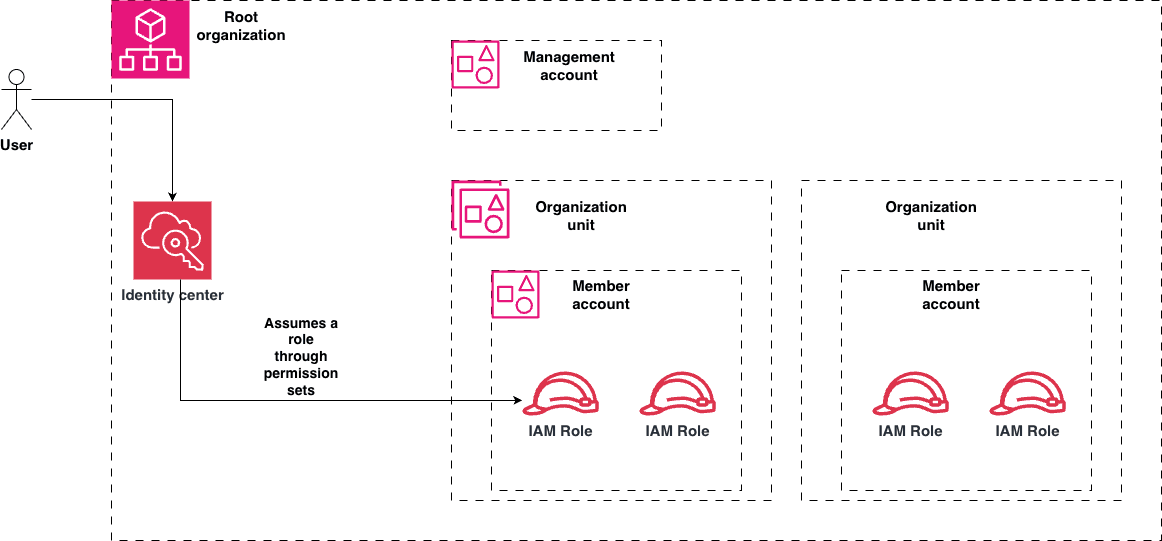
2.2. Identity Center
In this model, all human access goes through AWS IAM Identity Center (SSO). There are no IAM users in workload accounts.
Identity Center sits at the organization level, while permissions are enforced at the OU and account levels.
Human
  ↓
Identity Provider (Google / Okta / Azure AD)
  ↓
IAM Identity Center
  ↓
Permission Set
  ↓
IAM Role (in a specific account)
Important: Identity Center does not grant power by itself.
It only controls which role a human is allowed to assume. What that role can actually do is still constrained by:
- The account it lives in
- The OU the account belongs to
SCPsandControl Towerguardrails- Permission boundaries attached to the role
Tying it all together, we can see the following diagram:
Now that we have set the organization structure and how humans access AWS, we can start talking about permissions.
3. The Golden Rule of AWS Permissions
Always apply constraints at the highest level possible — and permissions at the lowest level possible.
This rule drives everything that follows.
In practice to achieve this we will use:
- Organizations SCPs
- Permission Boundaries
- Identity-based policies
- Resource-based policies
We will see how to use each of these in the next sections.
3.1. Mental Model: The Permission “Layers”
Think of AWS permissions as concentric safety rings:
┌────────────────────────────┐
│ Org SCPs (hard limits)     │  ← What must NEVER happen
├────────────────────────────┤
│ Permission Boundaries      │  ← Max power roles can ever get
├────────────────────────────┤
│ Identity-based policies    │  ← What a role is allowed to do
├────────────────────────────┤
│ Resource-based policies    │  ← Cross-account & data access
└────────────────────────────┘
4. Permissions, from the highest level to the lowest level
Let's deep dive into each of the permissions layers. The higher level we are the more coverage we have.
4.1. SCPs: The Non-Negotiable Guardrails
At this high level, SCPs are applied at the organization or OU level. What SCPs Are For
SCPs define what is absolutely forbidden, even for AdministratorAccess.
Example SCPs (Org or OU level) ❌ Block EC2 & RDS everywhere except Platform accounts
{
  "Effect": "Deny",
  "Action": ["ec2:*", "rds:*"],
  "Resource": "*",
  "Condition": {
    "StringNotEquals": {
      "aws:PrincipalAccount": [
        "111111111111", // platform-prod
        "222222222222" // platform-staging
      ]
    }
  }
}
❌ Prevent IAM User Creation (force Identity Center)
{
  "Effect": "Deny",
  "Action": ["iam:CreateUser", "iam:CreateAccessKey"],
  "Resource": "*"
}
Key principle:
SCPs should be boring, stable, and rarely changed.
If engineers complain about SCPs, you’re probably using them wrong.
4.2. Permission Boundaries: The Safety Net
What Permission Boundaries Are For:
We saw that SCP limit access to entire accounts, but what about specific individual roles or permission sets?
This is where permission boundaries come in.
For example you can add a permission boundary on a role used for CI/CD, and not an entire account. The following example will deny CI/CD roles from doing creation of IAM users, EC2 instances, RDS instances and Organizations actions.
{
  "Effect": "Deny",
  "Action": ["iam:*", "ec2:*", "rds:*", "organizations:*"],
  "Resource": "*"
}
But remember:
This is still constrained by SCPs.
4.3. Identity-Based Policies: Day-to-Day Permissions
These are applied at the role level. For example, you can create a role for a staging engineer that will be used in the permission set defined earlier, and attach it to an identity-based policy. Example: Staging Engineer Role:
{
  "Effect": "Allow",
  "Action": ["lambda:*", "s3:*", "logs:*", "cloudwatch:*"],
  "Resource": "*"
}
But remember:
This is still constrained by SCPs and permission boundaries.
4.4. Resource-Based Policies: Data Access, Not Power
Resource-based policies are applied at the resource level (S3 buckets, SQS, SNS, KMS, Lambda invoke permissions). These are used to grant access to specific resources to specific principals. Example: Cross-Account S3 Write (Staging Only):
{
  "Effect": "Allow",
  "Principal": {
    "AWS": "arn:aws:iam::123456789012:role/deployment-role"
  },
  "Action": "s3:PutObject",
  "Resource": "arn:aws:s3:::shared-bucket/*"
}
Resource policies are about who can touch my data, not infrastructure creation.
5. Bonus: Monitoring compliance
Okay, now we have given flexibility to engineers to move fast, but can we monitor if they are actually following our governance rules? For example, can we monitor if teams are creating public or non-encrypted S3 buckets?
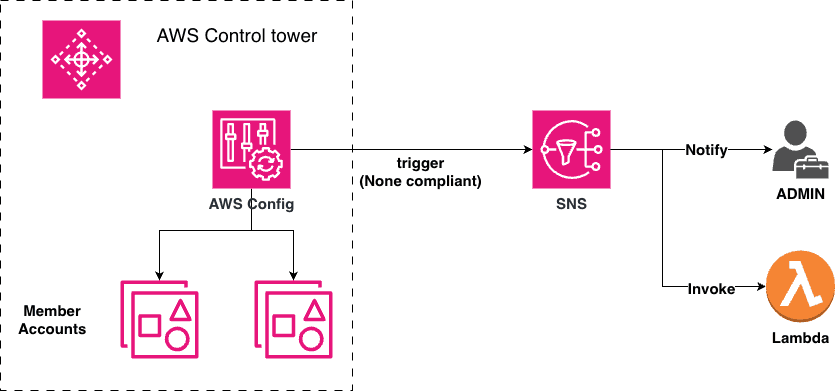
This is where AWS Control Tower comes in. It basically does two kinds of compliance monitoring:
- Preventive: Using
SCPsbehind the scenes which we have seen earlier. - Detective: Using
AWS Configto monitor the compliance of the accounts (we haven't seen this yet)
AWS Config continuously evaluates resources across all accounts and detects violations.
Typical checks:
- Public or unencrypted
S3buckets - Open security groups
- Missing required tags
IAMroles without permission boundaries- Logging or monitoring disabled
Violations are aggregated centrally and can trigger alerts through SNS which will alert the admin and even can trigger remediation Lambda functions.
6. Final Recommendation (Strong Opinion)
- ✅ Use
AWS Organizationsto group accounts and apply governance rules - ✅ Use
Identity Centerto control human access (don't useIAMusers) - ✅ Use
SCPsto say “never” at the organization or OU level - ✅ Use permission boundaries to say “at most” on roles and permission sets
- ✅ Use
IAMpolicies to say “usually” - ✅ Use
Control Towerto monitor compliance across all accounts.